
Free
3chosen apps
A little room for the essentials beyond Essentials.
+ your supported Essentials
Your everyday phone
Calls. Payments. The way home.
Simplicity should leave room for real life.
ClearHour blocks apps by default. Your supported phone essentials stay available automatically, along with the everyday apps you choose.
See what’s includedCore phone functions, without using your chosen-app allowance.
Keep a few apps available without session limits.
Example Free setup: 3 chosen apps, plus Essentials.
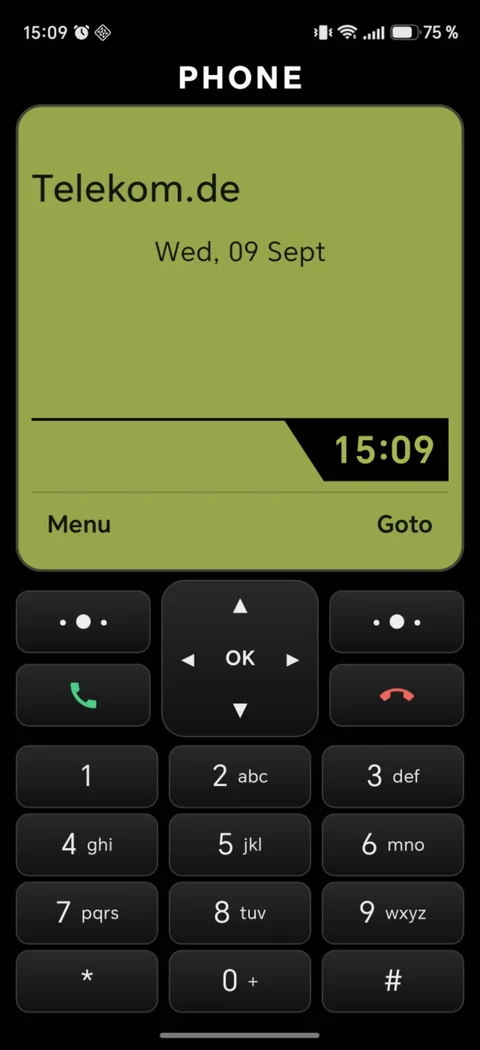
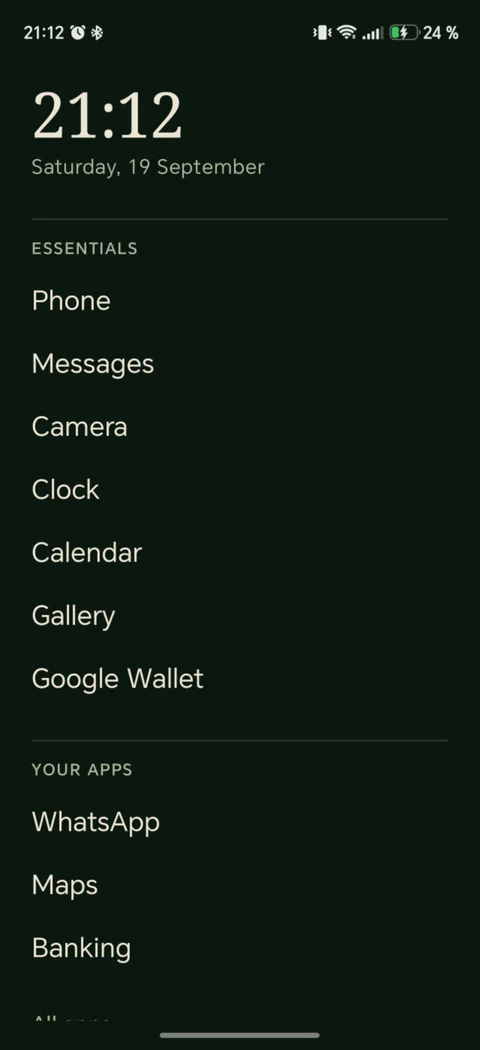
Meet Clear Home
A quiet list. A familiar keypad.
A photo that means something to you.
Make your home screen feel like yours, with ClearHour’s app rules behind every choice.
Optional. Included in every plan.
You can keep your current home screen, too.
Clear Home guides you to Android’s colour-correction setting. You turn grayscale on or off in Android. Ink changes the launcher’s appearance; other apps keep their own layouts.
An example: 09:00–10:00. You choose your daily hour.
The ClearHour difference
Your clear-minded self sets the rules.
ClearHour keeps them when temptation hits.
Change Your Apps, short-access limits and future Planned pauses.
Your normal rules stay locked. Keep using your essentials and chosen apps.
Clear Hour is for changing rules. It does not automatically unlock blocked apps.
Setup and deliberate Recovery Pass repair windows provide separate, limited editing access.
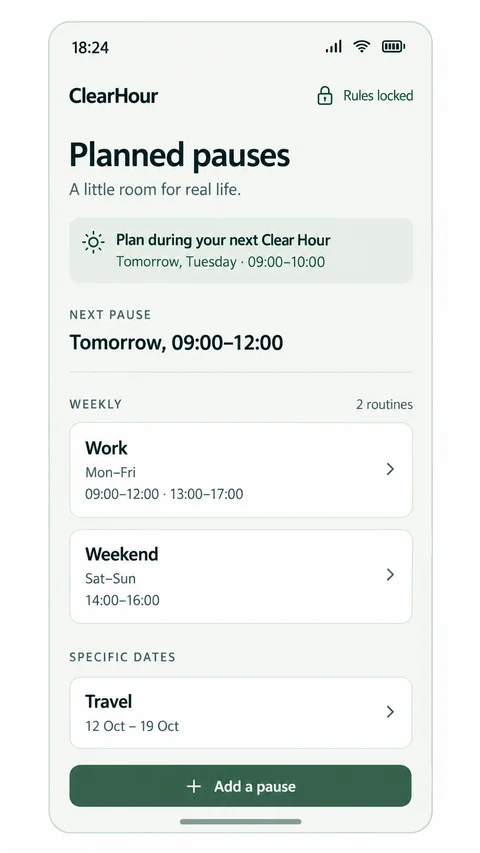
Planned pauses
Plan the times you need full access.
A workday. A study session. A trip away. Arrange full app access during your Clear Hour, with weekly routines or specific dates.
Your saved rules return automatically when the scheduled pause ends.
Included on Free, Plus and Max. No active-pause extension. Full access includes distracting apps; for a few everyday tools, use Your Apps.
A little access, on purpose
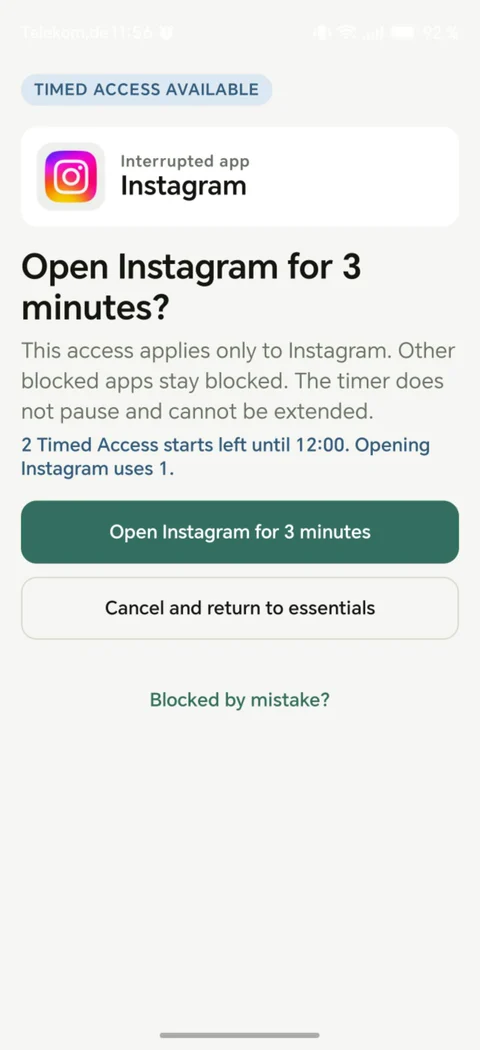
Need one blocked app for a quick task?
Enable optional Timed Access in advance. Open one app for 2–5 minutes, with a shared limit of up to 3 starts per hour across blocked apps. The timer cannot pause or be extended.
Outside a Planned pause, apps stay blocked when short access is off or the hourly allowance is used up.
Start simple
Every plan includes Essentials, Clear Home, Clear Hour,
optional Timed Access and Planned pauses.
Free
3chosen apps
A little room for the essentials beyond Essentials.
+ your supported Essentials
Plus
5chosen apps
A few more tools for your everyday.
+ your supported Essentials
Max
10chosen apps
More room for the apps your life needs.
+ your supported Essentials
Clear Home and Planned pauses are included on every plan. Current Plus and Max prices are shown in the app.
A little reassurance
Permission repair stays available. Recovery Pass gives you a deliberate way to fix your setup.
Talk to usSupported Essentials, including core phone functions and supported payments, stay available without counting toward Your Apps. You choose 3 additional apps on Free, 5 on Plus or 10 on Max. Apps such as Maps, WhatsApp and banking can be chosen as Your Apps; they are not automatically Essentials. Supported essentials vary by the apps and phone you use.
No. Clear Home is an optional launcher included in every plan. ClearHour also works with your existing home screen. You can choose Clear Home in Android and switch back anytime. Changing the launcher’s appearance or favourites does not change app-access rules.
No. Clear Hour is your daily one-hour window for changing normal app rules. Blocked apps remain blocked unless you change their access or another valid access rule applies. Setup and deliberate Recovery Pass repair windows provide separate editing access.
During Clear Hour or an active Recovery Pass, arrange full app access for weekly routines or specific dates. New pauses can start today. There is no active-pause extension. Full access includes distracting apps. Saved rules resume at the effective end of your schedule; overlapping pauses share a combined end. You can end a pause early, but cannot resume that ended interval. Planned pauses are included on every plan without an account requirement.
If you enabled Timed Access in advance and shared hourly starts remain, you can open one blocked app for 2–5 minutes. All blocked apps share your chosen limit of 1–3 starts per hour. Sessions cannot pause or be extended. You can also turn short access off. A valid Planned pause independently permits full app access without using these starts.
Permission repair is always available and does not use a Recovery Pass. A Recovery Pass opens a deliberate 30-minute repair window for changes to your setup. It does not directly unlock blocked apps. New pauses configured during repair can start today.
Optional Uninstall Protection adds friction to common impulsive uninstall paths. ClearHour is an Android app, not replacement firmware. It does not promise protection against safe mode, force-stop, ADB, root, recovery or factory reset. Protection also depends on the required permissions and your phone’s operating conditions.
ClearHour is currently for Android. “Dumbphone OS” is supporting brand language: ClearHour does not replace your phone’s operating system.
A phone that leaves room for you
Start with the phone you already own.
Get it on Google Play Back to the beginning ↑